Why are abandoned cart flows not stopping after a customer makes a purchase?
Last updated: May 25, 2026
Context
When running an abandoned cart campaign in Outcraft, customers who have already completed a purchase may still receive abandoned cart messages. This happens when the necessary Shopify webhook that signals a completed order is not configured correctly, preventing Outcraft from stopping the abandoned cart flow.
Answer
To stop abandoned cart flows when a customer completes a purchase, you must ensure the Order Creation webhook is enabled in Shopify with the correct API version. Without this webhook, Outcraft does not receive notification that an order was placed and cannot halt the abandoned cart sequence.
Follow these steps to verify and enable the webhook:
Log in to your Shopify admin panel.
Navigate to Settings > Notifications > Webhooks.
Check whether the Order Creation event is listed and enabled.
If it is missing, add a new webhook and select Order Creation as the event type.
Make sure the API version matches exactly the version specified in your campaign setup instructions.
Save the webhook.
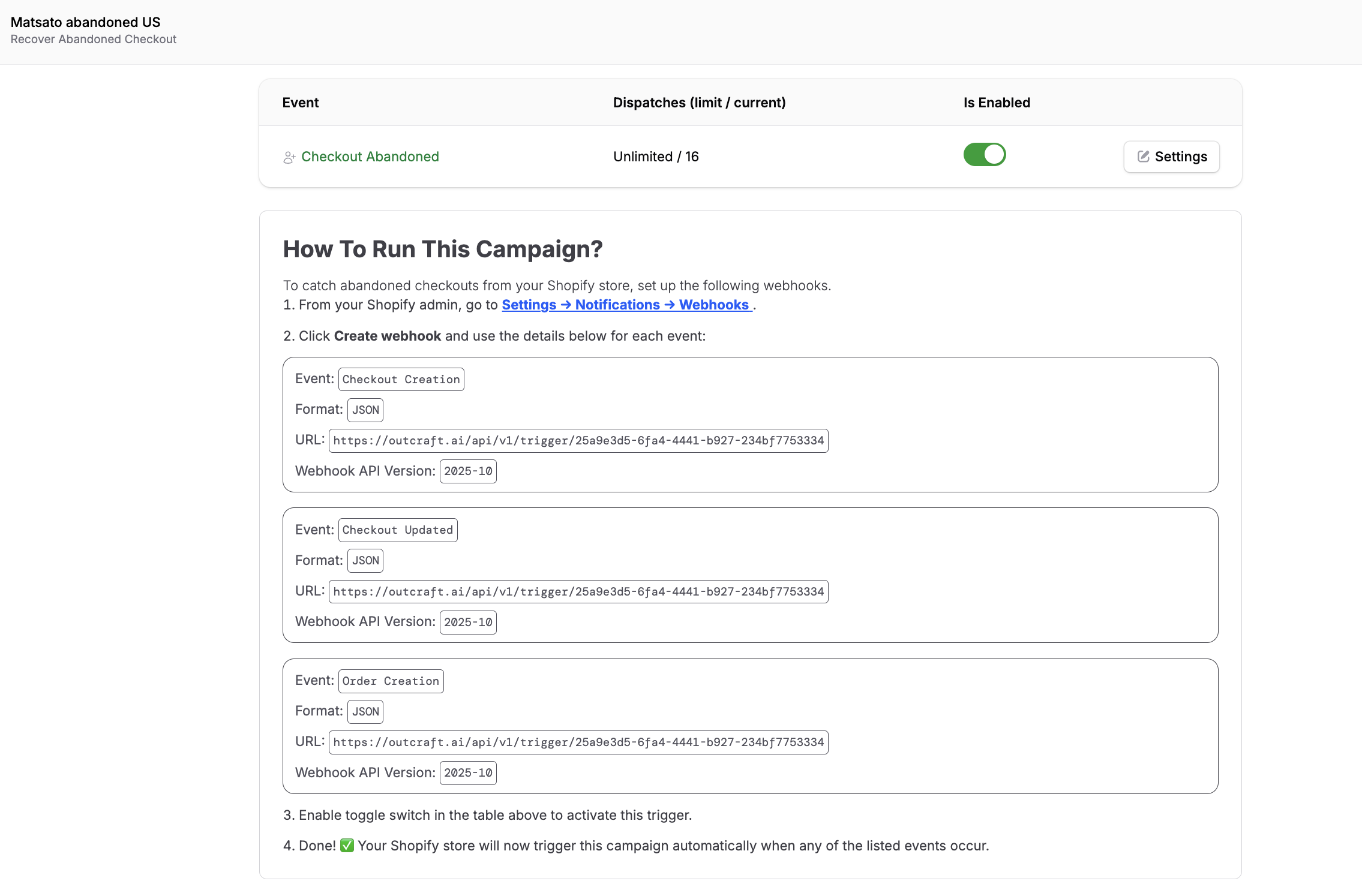
Once the Order Creation webhook is active and using the correct API version, Outcraft will receive order events from Shopify and automatically stop the abandoned cart flow for customers who have completed their purchase.