Managing Campaigns: Pause, Rename, Archive, Duplicate & Audit Log
Last updated: July 16, 2026
Manage campaigns from app.outcraft.ai/campaigns using the three vertical dots on each campaign row.
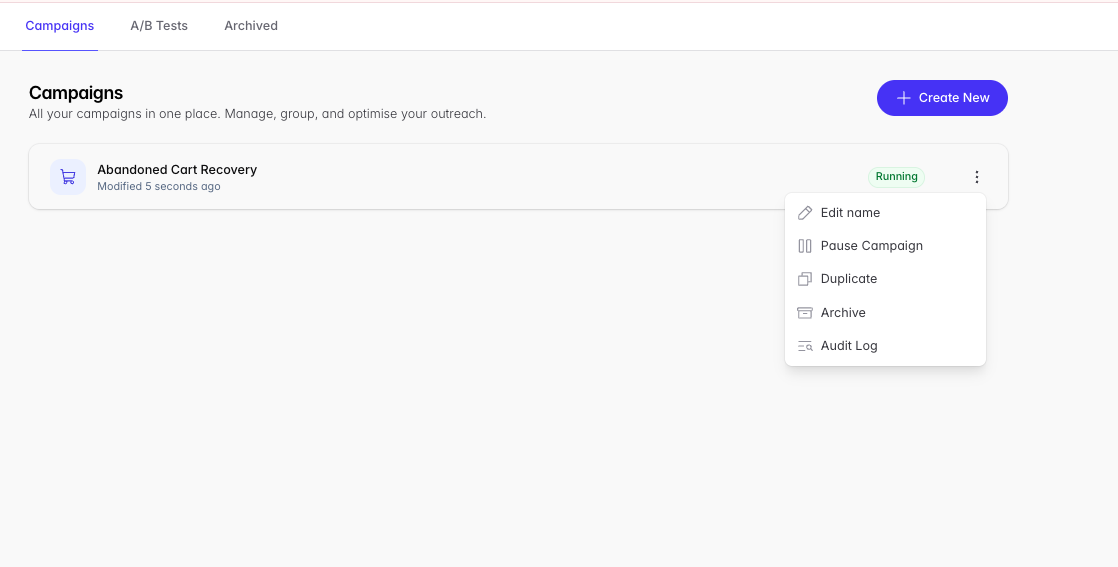
Pause
Pauses the campaign for as long as you like.
Prefer limiting instead of pausing? To keep a campaign active but cap the number of leads Outcraft dispatches, set a dispatch limit on the lead source inside the campaign. A lead dispatch is the entire flow from beginning to end — multiple call attempts, SMS, and emails for one lead count as a single dispatch.
Rename
Rename a campaign at any time — helpful for staying organized once you have many campaigns.
Archive
Campaigns are never deleted in Outcraft. To hide a campaign, click Archive — it moves to the Archive page and stops the campaign.
Duplicate
Makes a copy of your campaign, keeping settings and configuration. When duplicating you can change the company and the Campaign Source (integration origin).
Note: duplicating a campaign that uses a Custom API keeps the same API endpoint trigger as the original.
Changing integration source: an integration source cannot be changed on an existing campaign. Duplicate the campaign (or create a new one) with the new source instead.
Audit Log
A historical breakdown of changes to your campaign — when it was started, paused, and modified.