Conversions Page
Last updated: August 13, 2026
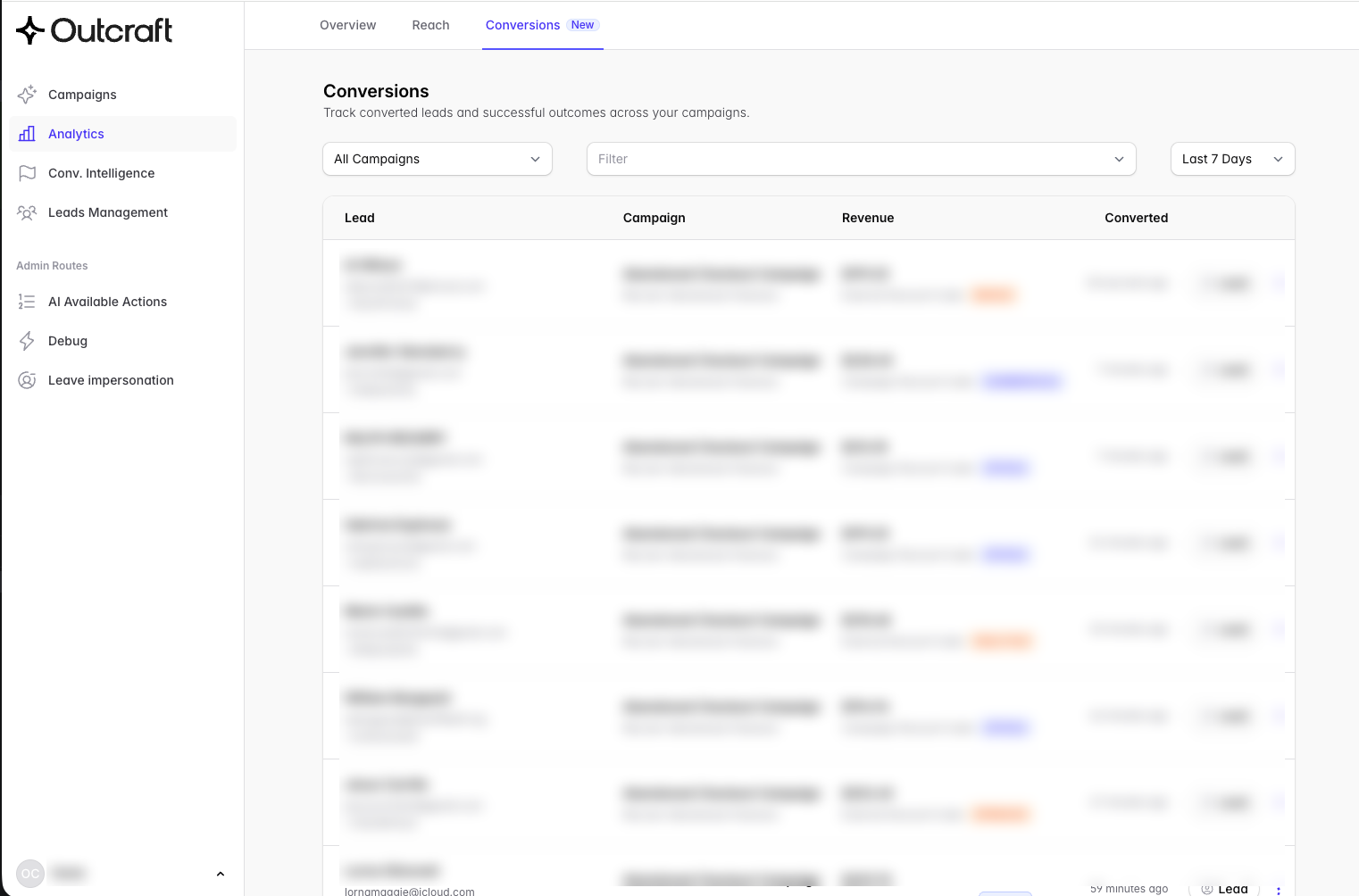
The Conversions page shows the leads that complete a result after a campaign. Go to Analytics, then Conversions.
The page can be viewed in your account here: https://app.outcraft.ai/analytics/conversions
The page shows one line for each conversion. Each line shows the lead, the campaign, the revenue, and the time of the conversion.
1. What Outcraft counts as a conversion
Outcraft records a conversion for three results.
Result | Description |
|---|---|
An order | A lead pays for an order in your store. |
A booked meeting | A lead books a meeting in your calendar. |
A qualified lead | The AI agent marks a lead as qualified. This applies only to a campaign with the Qualify Lead objective. |
An inbound call, an inbound message, or a support conversation is not a conversion. But these contacts can help Outcraft to attribute a later order. Refer to section 2.
2. How Outcraft connects an order to a campaign
When your store reports a paid order, Outcraft applies two rules in sequence.
Rule 1: a campaign discount code
Outcraft searches the order data for a discount code from one of your campaigns. If Outcraft finds a code, Outcraft credits the campaign that holds this code.
The Revenue column then shows the code below the revenue value.
Rule 1 does not examine the contact history. Outcraft credits the campaign, even if the campaign did not contact this lead.
Rule 2: a recent engagement
If Outcraft finds no campaign discount code, Outcraft looks for an engagement from the lead in the last 14 days.
An engagement is one of these actions:
The lead clicks a link in an email or in a message.
The lead replies to an email, a message, or a call from the AI agent.
The lead calls you or sends you a message.
The lead speaks during a call from the AI agent. The call must last more than 10 seconds.
If Outcraft finds an engagement, Outcraft credits the campaign of the most recent engagement.
These actions are not engagements:
The lead opens an email but clicks no link.
Outcraft delivers a message, but the lead does not reply.
The lead does not answer a call.
If no rule applies
If Outcraft finds no campaign discount code and no engagement in the last 14 days, Outcraft records no conversion. The order does not show on the page.
One order, one campaign
Outcraft credits each order to one campaign only. Outcraft does not divide the revenue between two or more campaigns. Outcraft records each order one time.
3. The columns
Column | Content |
|---|---|
Lead | The name of the lead. The email address and the telephone number show below the name. |
Campaign | The name of the campaign. The objective of the campaign shows below the name. |
Revenue | The total value of the order. If Outcraft applied rule 1, the discount code shows below the value. |
Converted | The time since the conversion, for example "3 days ago". Put the pointer on the time to see the full date. |
At the end of each line, the Lead button opens the record of that lead.
The Revenue column shows only for campaigns that can make revenue. These are the campaigns with these objectives:
Recover Abandoned Checkout
Upsell Post-Purchase
Post-Delivery Follow-Up
Client Reactivation
Send Information
If your selection contains no campaign with one of these objectives, the Revenue column does not show.
4. The controls
The campaign selector
The campaign selector is at the top left. The default value is All Campaigns. Select one campaign to see only the conversions of that campaign.
The filter
The Filter control has one option: Only using campaign discount code. Select this option to see only the conversions from rule 1.
5. Limits
Read these limits before you use the data.
The page shows no total
The page shows no total number of conversions and no total revenue. To see totals, go to the Overview page.
The page does not refresh automatically
Refresh the page in your browser to see new conversions.
The currency symbol is always a dollar sign
The Revenue column shows a dollar sign for all values. The value keeps the currency of your store. If your store sells in a different currency, ignore the dollar sign.
If you sell in more than one currency, do not add the values together. The result has no meaning.
Outcraft does not subtract refunds
Outcraft records the revenue one time, when your store reports the order. Outcraft does not change the revenue after a refund, a partial refund, or a cancellation. The revenue on this page is always the full value of the order.
A meeting counts at the time of the booking
Outcraft records a meeting conversion when the lead books the meeting. Outcraft does not remove the conversion if the lead cancels the meeting or does not attend.
Outcraft must recognize the lead
Outcraft identifies a lead by the email address or by the telephone number. Outcraft first makes the email address and the telephone number uniform.
If a customer orders with a different email address and an unknown telephone number, Outcraft creates a new lead. Outcraft then records no conversion.
Outcraft sees only the orders that your connected systems report
Outcraft records an order only if a connected system reports it. These systems can report orders:
Shopify
Klaviyo
CheckoutChamp
NextCommerce
A custom connection to the Outcraft API
Outcraft does not see an order from your shop, from the telephone, or from a sales channel that you did not connect.
These systems can report a booked meeting: HubSpot and GoHighLevel. The AI agent can also book a meeting in Calendly, in HubSpot, or in GoHighLevel.
CheckoutChamp has two additional conditions
Outcraft rejects an order that is more than 2 hours old.
Outcraft rejects an order that has no telephone number.
One account cannot separate two storefronts
If you connect two storefronts to one account, the page shows the conversions of both storefronts together. You cannot filter the page by storefront.
Test leads do not show
Outcraft records no conversion for a test lead.
The delay is short
A new conversion shows on this page a few seconds after your store reports the event. The totals on the Overview page are slower. These totals can be up to 2 hours behind.
The available history
This page can show conversions from 15 December 2025. The totals on the Overview page are correct from 23 June 2026.
6. Frequently asked questions
A customer bought after my campaign, but the order does not show. Why?
Examine these causes in sequence:
The order is outside the selected period. Change the date range.
The lead did not engage in the 14 days before the order, and the order contains no campaign discount code. Outcraft then records no conversion.
The customer used a different email address, and Outcraft does not know the telephone number.
Your store did not report the order to Outcraft.
Can I export the data?
No. The page has no export function.
Why does the Revenue column not show?
Your selection contains no campaign with a revenue objective. Refer to section 3.