How to setup Dynamic Cart Link (unique_id) using Custom API
Last updated: June 8, 2026
Setup Dynamic Cart Link
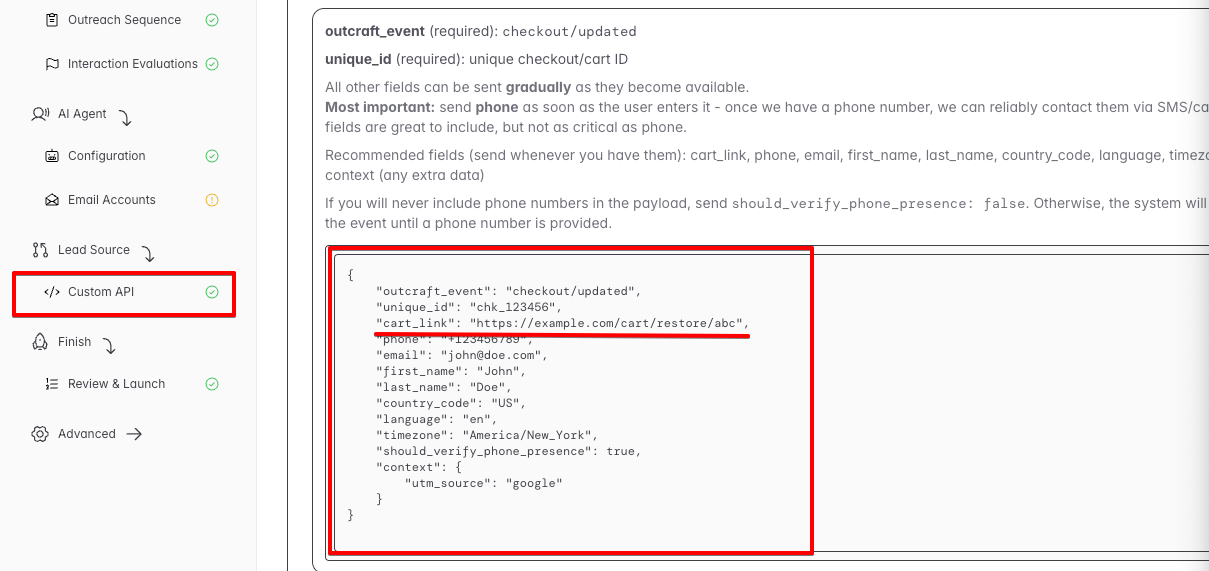
To send a personalized recovery checkout link to each lead after a conversation, follow these steps:
Go to your General Campaign Settings and set the Link Source to Dynamic.
When sending a
checkout/updatedevent via the Custom API, include acart_linkfield in the event payload with the fully constructed checkout URL for that lead. For example:{ "outcraft_event": "checkout/updated", "unique_id": "some_unique_id", "cart_link": "https://yourcheckout.com/some_unique_id" }The system will detect the
cart_linkin the lead's metadata and use it as the recovery checkout link when sending campaign messages.
Usage
Once set up, every time a lead's checkout/updated event is received with a cart_link, the lead's metadata will be updated with the latest link. This means if a lead updates their cart or provides additional information (such as a phone number) later in the funnel, you can send a new event with an updated cart_link and the lead record will be refreshed accordingly.
Note on lead identification: Leads are identified in the following order of priority: unique_id, then email, then phone number. If none of these match an existing lead, a new lead is created. Also note that email addresses are normalized — for example, anything after a + sign in a Gmail address is stripped, so user+tag@gmail.com is treated the same as user@gmail.com.